

Go live
When your scenarios pass and the stability score looks right, click Promote to live on the job page. Live traffic at the trigger URL switches to the taught version immediately. There is no separate release step and nothing to configure. If the job’s stability is low, the dialog says so: the tier, the score, and a suggestion to add scenarios and get every sample passing first. It is a warning, not a gate. You decide.Calling a live job
The same URL you taught against serves production. The only difference is the payload: no teach envelope.Teaching a job that is already live
Live jobs keep learning. Send a new sample with the teach envelope and the builder works on a new version while production traffic continues on the current one, untouched. As soon as a live job has taught changes waiting, it shows Live · new lesson ready. Review the new version, run the samples, then click Promote to live again to switch traffic over.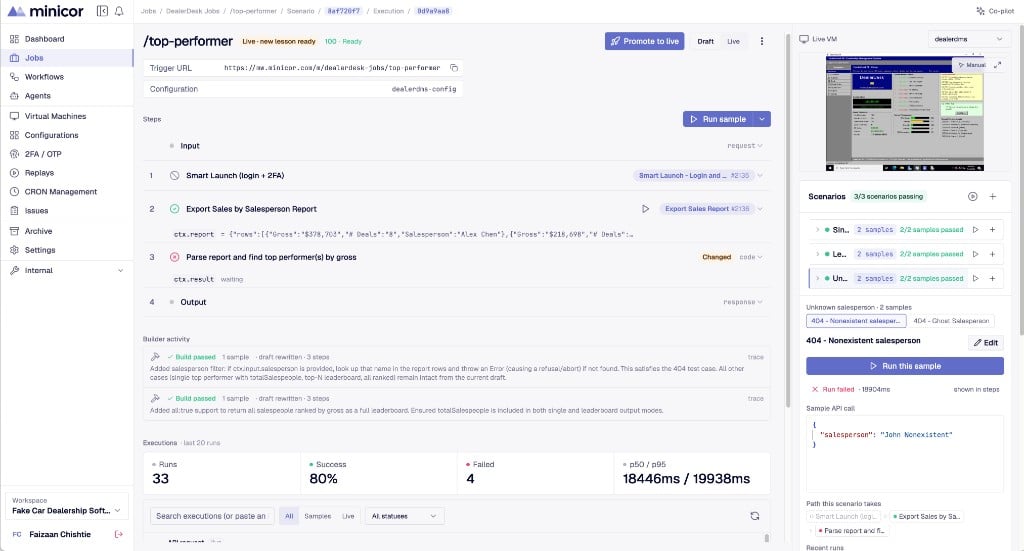
Production is never where you teach. Everything you teach runs against the job’s working version; live traffic only changes when you say so.