

From a failing sample to the step
- On the job page, select the failing sample. The job’s steps light up according to what happened in its latest run, so you can see exactly where it went wrong.
- Click Fix in Build. This drops you into the Build view scoped to the failing step’s automation.
- The left side shows the automation’s steps. The right side shows the desktop and the output of each run, with the evidence from the failing job run already loaded.
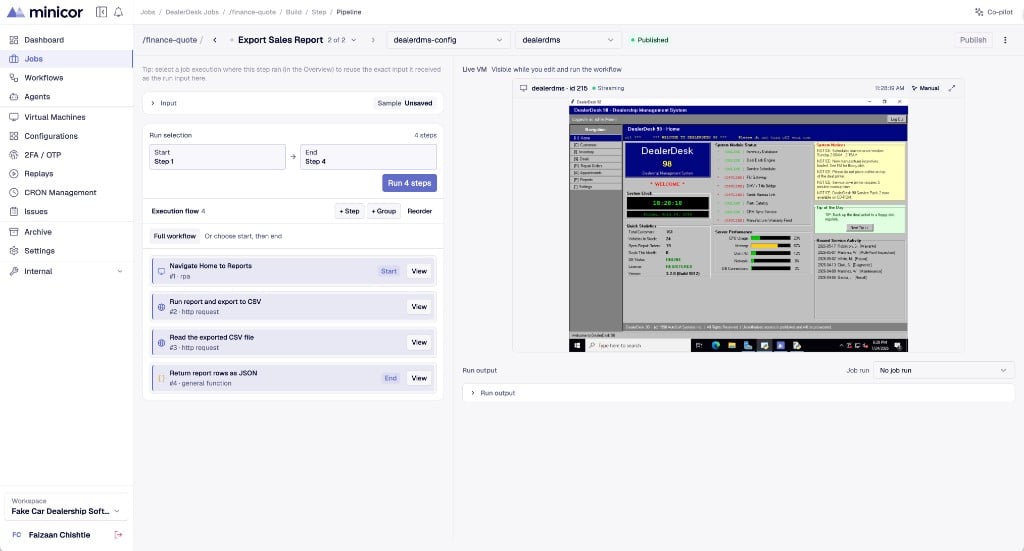
Working in the Build view
- Edit a step’s code directly, then run just that step, a range of steps, or the whole automation against a live desktop.
- Seed the run with the input from the failing job run, so you are reproducing the real failure rather than a synthetic one.
- Watch the desktop live as steps execute, the same view the builder uses.
Whatever you change by hand, prove it with the samples afterward. A manual fix that passes the scenarios is a fix; one that skips them is a guess.