> ## Documentation Index
> Fetch the complete documentation index at: https://docs.minicor.com/llms.txt
> Use this file to discover all available pages before exploring further.
# What is Minicor?
> The interface between AI and legacy desktop applications: call them like any API.
Minicor is SOC 2 Type II certified and HIPAA compliant. Automations and their data can run entirely [on your own cloud](/operations/network-boundary).
Minicor is the interface between AI and legacy desktop applications: call them like any API. Minicor agentically builds self-healing automations on any no-API system, EHR, ERP, DMS, TMS, SCM, CMS, then hands you an API endpoint to call. No integration to build, nothing to maintain.
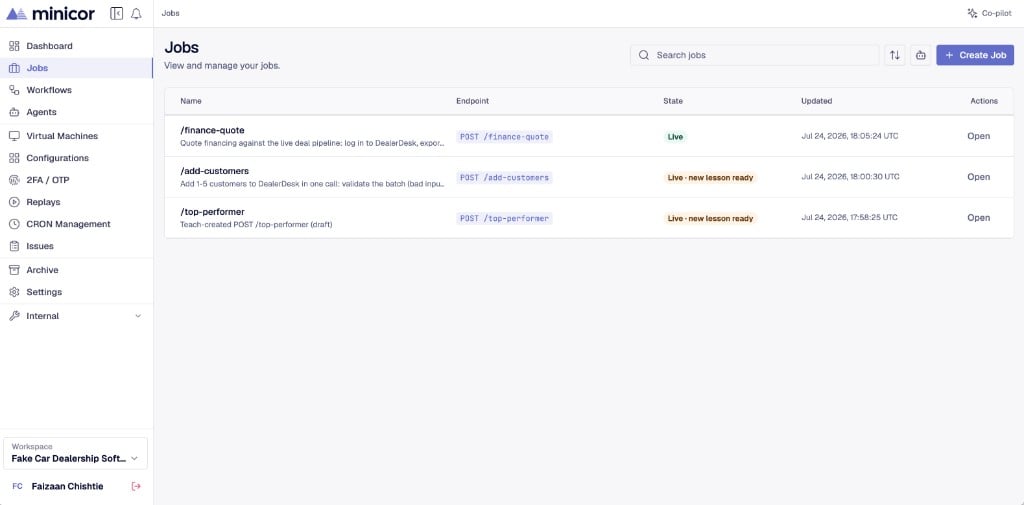
The unit of automation is a **job**. A job is an endpoint that represents an automation. You teach it by sending real sample API calls. The builder works on the automation until every sample passes. Then you go live and call the same endpoint from your product, like any other API.
 ## How you work with Minicor
1. **Connect a desktop.** Jobs run on a Windows machine with the Minicor Desktop Service installed. Use a cloud desktop provisioned through Minicor or a machine in your own environment.
2. **Teach a job with real examples.** Send sample API inputs to the job's endpoint. The platform buckets your samples into **scenarios**, one for each behavior the job needs to handle.
3. **Watch the builder work.** The builder constructs and refines the automation until every sample passes. It asks you questions when it needs answers.
4. **Go live.** The job earns a [stability score](/teaching/stability) as samples pass and live traffic succeeds. When you go live, the same URL serves production traffic.
> The samples you teach are the definition of correct. The more scenarios a job has, the more reliable it gets. That is also how [self-healing](/teaching/self-healing) works on Minicor.
## What runs underneath
Each job is a sequence of automation steps that execute on a desktop through the Minicor Desktop Service. Steps drive the target application the way a person would: navigating screens, filling fields, reading results. Every run is recorded, so you can watch a [replay](/running/executions-and-replays) of exactly what happened on the desktop.
## What the platform gives you
| | |
| ----------------------------- | --------------------------------------------------------------------------------------------------------------------------------------------------------------------------- |
| **Stay in control** | [Verification](/operations/verification) checks the screen before critical actions, human review steps gate the writes you choose, and agent actions require your approval. |
| **End-to-end observability** | Audit logs and a video [replay](/running/executions-and-replays) of every step, for every run. |
| **Plugs into your stack** | [Status webhooks](/api/calling-jobs#status-webhooks) and telemetry push events to your systems in real time. |
| **Authentication that holds** | [2FA / OTP](/running/two-factor) handled inside the run, credentials vaulted in [configurations](/running/configurations), and authenticated sessions reused across runs. |
| **Scale** | Run many jobs at once. Runs serialize per [desktop](/running/desktops) and scale out across desktops. |
| **Host anywhere** | Our cloud, or [entirely on yours](/operations/network-boundary). |
## Where to start
Teach your first job in a few minutes.
What happens between your API call and the desktop.
How teaching works and how scenarios are formed.
Point your coding agent at the Minicor MCP.
## How you work with Minicor
1. **Connect a desktop.** Jobs run on a Windows machine with the Minicor Desktop Service installed. Use a cloud desktop provisioned through Minicor or a machine in your own environment.
2. **Teach a job with real examples.** Send sample API inputs to the job's endpoint. The platform buckets your samples into **scenarios**, one for each behavior the job needs to handle.
3. **Watch the builder work.** The builder constructs and refines the automation until every sample passes. It asks you questions when it needs answers.
4. **Go live.** The job earns a [stability score](/teaching/stability) as samples pass and live traffic succeeds. When you go live, the same URL serves production traffic.
> The samples you teach are the definition of correct. The more scenarios a job has, the more reliable it gets. That is also how [self-healing](/teaching/self-healing) works on Minicor.
## What runs underneath
Each job is a sequence of automation steps that execute on a desktop through the Minicor Desktop Service. Steps drive the target application the way a person would: navigating screens, filling fields, reading results. Every run is recorded, so you can watch a [replay](/running/executions-and-replays) of exactly what happened on the desktop.
## What the platform gives you
| | |
| ----------------------------- | --------------------------------------------------------------------------------------------------------------------------------------------------------------------------- |
| **Stay in control** | [Verification](/operations/verification) checks the screen before critical actions, human review steps gate the writes you choose, and agent actions require your approval. |
| **End-to-end observability** | Audit logs and a video [replay](/running/executions-and-replays) of every step, for every run. |
| **Plugs into your stack** | [Status webhooks](/api/calling-jobs#status-webhooks) and telemetry push events to your systems in real time. |
| **Authentication that holds** | [2FA / OTP](/running/two-factor) handled inside the run, credentials vaulted in [configurations](/running/configurations), and authenticated sessions reused across runs. |
| **Scale** | Run many jobs at once. Runs serialize per [desktop](/running/desktops) and scale out across desktops. |
| **Host anywhere** | Our cloud, or [entirely on yours](/operations/network-boundary). |
## Where to start
Teach your first job in a few minutes.
What happens between your API call and the desktop.
How teaching works and how scenarios are formed.
Point your coding agent at the Minicor MCP.